Monday, March 14, 2011

A thank you from Caleb and the St. Baldrick’s Foundation

Thank you all again for making my head-shaving event so incredibly successful. At the last minute, “Phoebe” donated 11,500–exactly 250 had come in! And with the matching gifts that will trickle in, St. Baldrick’s made more than $17,000 from my one silly haircut.

While I’m sorry to have missed the party at Fado’s, I’m glad we did it at home: Phoebe had a ton of fun sitting on my lap and cutting off individual curls to put in a bag. The curls will go out to the fairy garden tomorrow so that the faries can use them for beds.

Thank you all again, and don’t be too surprised if you hear from me again in a year…

Cheers, Caleb

Wednesday, February 23, 2011

The fro must go

From my friend Caleb:

As many of you know, my daughter is battling a rare and aggressive form of brain cancer. We’ve been fighting it for 2 years now, and continue to do so. One thing that’s become apparent is that there just hasn’t been enough money put into pediatric cancer research. St. Baldrick’s Foundation is a non-profit foundation that has donated more money to pediatric cancer research than anyone else (except for the government). To date, they’ve raised and granted more than $56 million. The remarkable thing is that they do this by getting people like me to shave their heads—and people like you to be of a generous spirit (you can see where this is going, can’t you?)

While “shaving events” happen year-round, the big events tend to be around St. Patrick’s Day. In Seattle, the event is at Fado Irish Pub, and is 2 weeks from today (march 10th). I just found out yesterday, and have decided to set an ambitious goal–$7500 in 2 weeks. If you feel inspired to make a donation, please do so. As you can see from the photo on my page, my hair has become rather unruly, making the change to a shaved head more dramatic. As my wife has been saying, “the ‘fro must go!”, and what better way to get shorn?

Thanks!
Caleb

http://www.stbaldricks.org/participants/calebthompson

Monday, February 7, 2011

Giving Back

This is a slightly modified version of a post I made at Development@msnbc.

I’m a big fan of serving my community and supporting non-profit organizations. Serving is in our DNA as humans. We give birthday presents, give rides to the airport, cook a meal for someone in need, give time to mow someone’s lawn, give our money to causes we believe in. We serve in various capacities in our communities, our churches, or maybe sit on the board of a non-profit organization. We do it because we believe it is the right thing to do. I believe we do it because it is an integral part of our beings.

There’s so many organizations doing great and wonderful things for our communities and individuals throughout the world. Some of those organizations are large, well funded, and probably have good sized technology organizations to help support them. But there’s a large number of organizations out there that are small, struggling to figure out how to spend their limited money in the most effective way for their mission.

A few weeks ago I participated in Seattle GiveCamp. It was a part of a larger GiveCamp weekend happening in 14 cities across the United States. 2011 was the fourth year GiveCamp has been held, and there were more projects built for non-profit organizations this year than had been built in the previous three years combined. In Seattle, we had 50 volunteers working on 22 projects for 20 different local charities. We started at 5PM on Friday night and wrapped up at 5PM Sunday. My co-worker John Bennett was also signed up for the GiveCamp happening in NYC.

I worked on building a donor management system for two different charities: AtWork! Washington and the Haiti Sustainable Development Foundation. Both charities had been using a series of spreadsheets that were emailed among different users to keep track of their donations and donors. You can imagine the pain of trying to keep that kind of a system straight…

Being primarily a .Net developer, I’ll admit I had a little anxiety going into the weekend. What if the team I was working with wanted to use Rails? Or Java? I figured it would be a great learning experience either way.

I ended up coming away having learned several things:

  • There are a lot of developers out there that have a passion for helping non-profits in their free time. This was my first time at an event like this, but many of the volunteers have done stuff like this together previously.
  • The night before our kickoff, Microsoft released a ton of goodies: ASP.NET MVC 3, SQL Compact Edition 4, NuGet, IIS Express 7.5, WebMatrix, etc. That stuff enabled me to prototype a web based donor system in just a few hours. Awesome stuff!
  • Build vs. Buy: Salesforce.com provides non-profit organizations 10 user licenses for free and discounts on additional licenses. There is also an open-source Non-Profit Starter Pack project that applies non-profit centric customizations on top of Salesforce.com. In the end we leveraged this for our solution. Turned out all of our work was already done for us! All we needed to do was some minor customizations and prepare some training materials.
  • Non-profits have technology needs just like businesses do. Every dollar they spend towards that necessary “stuff” is a dollar that they cannot put towards fulfilling their mission. The people who run these organizations are extremely grateful for the people who organize and work at events like GiveCamp or dotOrg Weekend. It makes their organizations more effective and able to focus on what really matters to them.
  • Accomplishing stuff in a weekend is great. I love the fast pace and desire to get stuff done!
  • Giving of my time is a very fulfilling act of service.

I don’t need an excuse to serve. While GiveCamp was a great opportunity, I desire to do stuff like this more frequently and without needing a whole weekend and organization around it. Just reaching out to fill I need I see anywhere is all it takes.

Consider giving your skills and expertise to a cause that is near to your heart, or to any organization that has a need. Reach out to your neighbor or the guy you meet at the coffee shop. You really can make a big impact in your community and in the world. It just takes one.

Msnbc.com (my employer) has a Giving Program as one of the benefits for employees. Msnbc.com matches up to $12,000 annually for employee’s cash donations to eligible organizations. What a great way to get more bang for your buck! If I give $100 to the King County Boy’s and Girls Club, they actually get $200. Sweet!

Wednesday, January 5, 2011

nSosumi: a c# port of a MobileMe scraper

This is a C#/.Net port of Sosumi by Tyler Hall. Tyler’s original PHP project can be found here: https://github.com/tylerhall/sosumi

nSosumi will allow you to programmatically retrieve your iOS device’s current location, send it a message/play a sound, remotely lock or remotely wipe your iOS device. I’ve tested it with my iPhone 4’s and an iPad, all running iOS 4.2.

You can find the source here: http://code.google.com/p/nsosumi. I’ll be providing more details soon.

Thursday, September 2, 2010

Resolving TFS error TF14087: Cannot undelete X because not all of the deletion is being undeleted

At work, we recently encountered this error in TFS when trying to merge from our trunk into a project branch. There’s some information on the internet about this error, but none of them directly applied to our issue. Thankfully, one of the benefits of having Microsoft as a parent company is access to TFS engineers.

We got into this situation when someone deleted a folder in the trunk and then re-added a folder with the same name. And then deleted it. And re-added it. When you do this without merging between the delete and adds, TFS gets real confused. It tries to merge the delete and the add (and in our case, the second delete and second add), and because they are all the same name and path, you get TF14087.

The solution (thanks George) was pretty simple:
Get the deleted id for all of the deletes of the folder:

tf dir /recursive /deleted /slotmode $/project/trunk. 

This gives output like:

$/project/trunk:
$Build
$Configs
$Databases
$Deploy
$Docs
$External
$Folder
$Folder;X246937
$Folder;X246938

In our case, there are three entries for $Folder, two with deleted ids, and the one folder that has not been deleted (the last add).
Destroy the deleted folders by using their deleted ids.

tf destroy /preview $/ijv/trunk/folder;X246937

Adding the /preview argument let’s you confirm what would be done when issuing the destroy command. After you review the output and make sure you’re not destroying something you don’t mean to, remove the /preview and run the command.

Then we run it for the other deleted id:

tf destroy /preview $/ijv/trunk/folder;X246938

Finally, do the merge from the trunk back into the project branch.
That resolved the issue for us. We lost the history of the original two versions of that folder, but it did allow us to move forward with merging. Hopefully this information will help someone when trying to resolve the same issue.

Tuesday, May 25, 2010

My love affair with WinDbg (or high CPU utilization in ASP.Net and the runaway iterator)

A while back I attended a “Debugging .Net Applications” course taught by John Robbins from Wintellect. I loved the course and ever since I’ve grown more and more fond of WIndbg. I absolutely love how it can quickly take an issue and lead you to the core problem.
A few weeks ago, we noticed in one of our pre-production environments incrementally increasing CPU utilization in our ASP.Net application:
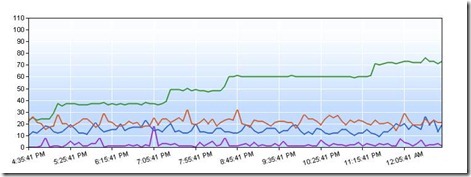
Key:

  • Proc - green
  • %GC - purple
  • Requests per second - blue
  • Avg request time - red

Windbg works best if you have a hypothesis that you want to test. We had a few theories. Our best theory was that we had a process that gets into an infinite loop, and each time it does, it maxes another processor core (these are 8 core servers). We expected IIS to protect us from runaway requests, and if there really was an infinite loop, why weren’t we seeing a StackOverflowException, but this was still our best guess. We set out to test it.

First, we captured a dump by attaching Windbg to the apppool running our application. Find the process id for the app pool of interest:

Then attach WinDbg to the process:
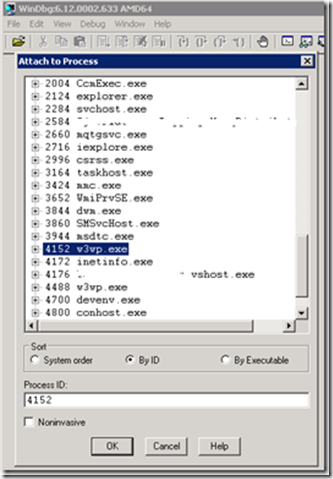
Then, get the dump from Windbg by issuing

.dump /ma /u e:\dumps\highCpu

This will create a dump file with a timestamp on the file name containing all the information we need to debug both native and managed code. We could also just do the debugging while we are attached the process, but I wanted to copy the dump off to another machine to do the analysis. Now, in Windbg, load up the dump file and psscor2:

.load psscor2

The first command I ran was !runaway. !runaway tells us the time spent by each of the processes threads executing user mode code. You can pass additional parameters to show time spent in kernel mode as well, but for this case, we’re only interested in user mode. The time reported is the time spent executing code since the thread was created. Here is the top of the results:

0:073> !runaway
User Mode Time
Thread           Time
33:1724          1 days 16:42:13.985
39:17d4          1 days 15:00:01.087
40:1a30          1 days 2:38:40.506
34:1808          0 days 15:50:55.446
41:174          0 days 9:35:21.695
46:260          0 days 8:59:35.480

The top three threads look interesting. That’s a lot of execution time (in fact, the top thread is almost the entire time since the last deployment). Let’s switch to thread 33 and see what we can find. I’m not including the stack trace here, but running these commands switches to the suspicious thread and shows the clr stack:

~33s 
!clrstack

What I noticed when looking at the stack of the top three threads is that they were all in the same method. Very suspicious! Looking at that method, we found this:

private static IEnumerable<foo> GetAncestors(Foo foo, ControllerContext controllerContext)
{
   while (foo.ParentId.HasValue)
   {
      int parentId = foo.ParentId.Value;
      foo = controllerContext.GetFoo(parentId, true);

      if (foo == null)
      {
         yield break;
      }

      yield return foo;
   }
   yield break;
}

If there was a circular reference in a chain of Foo’s, we’d never exit this loop. The fix turned out to be easy. We keep track of which ancestors we’ve already returned, and if we come across the same one twice, we throw:

private static IEnumerable<foo> GetAncestors(Foo foo, ControllerContext controllerContext)
{
   var ancestorIds = new HashSet<int>();

   while (foo.ParentId.HasValue)
   {
      int parentId = foo.ParentId.Value;

      if (ancestorIds.Contains(parentId))
      {
      throw new InvalidOperationException(
         string.Format(
         "There is a circular reference in the ancestors of Foo '{0}'.",
         foo.Id));
      }

      foo = controllerContext.GetFoo(parentId, true);

      if (foo == null)
      {
         yield break;
      }

      yield return foo;
   }
   yield break;
}

The investigation took all of about 15 minutes, the code fix about 10 minutes more, testing and deployed all in 5 hours. Windbg is quickly becoming one of my favorite debugging tools!
Monday, February 8, 2010

Reclaiming disk space from Outlook OST files

I recently received a warning for Windows telling me I was dangerously low on disk space on my laptop’s C: partition. I intentionally don’t put a lot on my C: because I like to be able to pave my machine’s OS frequently without having to worry about backing up my data, so my C: partition usually only has the OS and applications. I have 40 GB dedicated to my C: partition, and I have never bumped up against any space constratints.

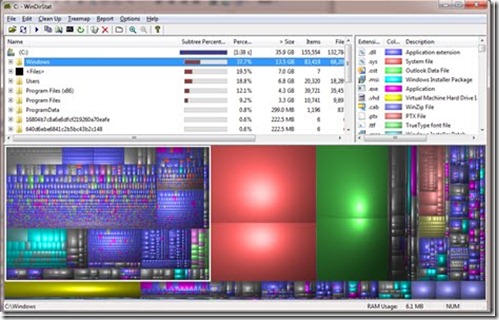
I ran WinDirStat to see what was taking up so much space. Aside from the usual suspects (pagefile.sys and hiberfil.sys), I saw two large files, below in green (the two reds are pagefile.sys and hiberfil.sys)

Turns out they are two OST files connected to my two Exchange accounts (Outlook 2010 lets you have multiple Exchange accounts in a single profile - very cool!). Each OST was using over 10 GB of space! I frequently archive my mail to PST files (located on another partition), so I was surprised the OST’s were so big.
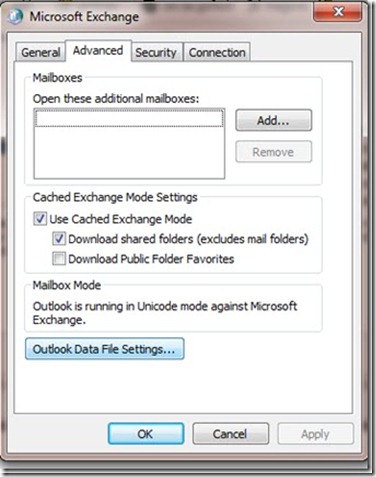
The solution was to compress the OST files. I had forgotten that you can compress not only PSTs but also OSTs. Here’s the steps: (Again, this is Outlook 2010. Previous version may be slightly different.)

  1. Close Outlook.
  2. Open the Mail control panel applet.
  3. Click the Data Files button.
  4. Select the file associated with your Exchange account. It’s named with your default email address.

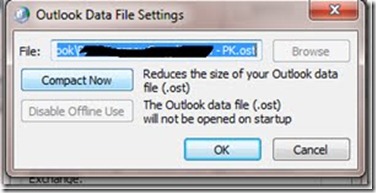
  5. Next, click the Outlook Data File Settings button.

  6. Finally, click Compact Now. Sit back and wait - It takes a while. For my 10GB file, which compressed down to about 5GB, it took about 3 hours.

I was able to quickly reclaim 11GB of disk space on my C: partition by compressing my OST files. Hopefully this will help someone else with the same predicament!